

EatSmart Scale Manual: Comprehensive Guide
Welcome! This comprehensive guide details operation, troubleshooting, and maintenance for your EatSmart scale – kitchen or bathroom – ensuring accurate and reliable measurements.
Explore model-specific instructions, calibration steps, and warranty details for a seamless weighing experience.
EatSmart scales are designed for precision and ease of use, catering to both kitchen and health-focused applications. From digital kitchen scales like the Precision Pro ESKS-01 to high-capacity bathroom scales such as the ESBS-56, EatSmart offers a diverse range of models.
These scales incorporate advanced sensor technology, providing accurate weight readings. They are built with user-friendly features like unit conversion and tare functions. EatSmart prioritizes quality, backed by a 2-year guarantee, ensuring a reliable weighing experience for all users.
Understanding Different EatSmart Scale Models
EatSmart offers a variety of scales tailored to specific needs. The Precision Pro ESKS-01 is a digital kitchen scale ideal for precise ingredient measurements. The GetFit ESBS-06 focuses on fitness tracking, offering features beyond basic weight. For bathroom use, the ESBS-56 Precision 550lb scale provides extra-high capacity.
Each model boasts unique functionalities, but all share EatSmart’s commitment to accuracy and user-friendliness. Understanding these differences helps you select the perfect scale for your requirements.
EatSmart Precision Pro ESKS-01
The EatSmart Precision Pro ESKS-01 is a digital kitchen scale designed for accuracy. To change units, simply press the UNIT button, cycling through grams, ounces, pounds, and kilograms. Ensure placement on a hard, flat surface for optimal results.
Utilize the tare function to subtract container weight. This scale is perfect for baking and cooking, providing precise measurements for consistent recipes. It’s a reliable tool for portion control and dietary tracking.

EatSmart GetFit ESBS-06
The EatSmart GetFit ESBS-06 requires battery insertion with the flat end against the spring, initiating a display on the LCD screen. Select your desired measurement unit before first use. This scale features a Fitness Mode for tracking health metrics.
Ensure proper operation by following the on-screen prompts. The GetFit scale is designed to help you monitor your weight and fitness goals effectively, providing consistent and reliable data.
EatSmart ESBS-56 Precision 550lb Bathroom Scale
The EatSmart ESBS-56 is a high-capacity digital bathroom scale, arriving with 3 AAA batteries and a 2-year guarantee. This superior quality scale offers a 550lb capacity. Follow the step-by-step manual for battery installation and calibration.
For accurate readings, place the scale on a hard, flat surface. Stand still with your feet centered on the platform during measurement. Enjoy reliable weight tracking!
Initial Setup and Battery Installation
Proper battery installation is crucial for accurate operation. Locate the battery compartment, typically on the scale’s back. Insert batteries, ensuring correct polarity (flat end against the spring). The LCD should display, indicating successful installation.
Close the door securely. For the GetFit ESBS-06, wait for the display to show a readiness indicator. Always use fresh batteries for optimal performance and longevity.

Battery Type and Placement
EatSmart scales generally require AAA batteries, though specific models may vary. Open the battery compartment located on the scale’s underside. Insert the batteries, strictly adhering to the polarity markings (+ and -) inside the compartment.
Ensure the flat end of the battery aligns with the spring contact. Incorrect placement will prevent the scale from powering on. The ESBS-56 includes batteries, while others require separate purchase.

Powering On and Initial Display
After correctly installing the batteries, the EatSmart scale should automatically power on. The LCD will illuminate, typically displaying “0.0” or a similar initial reading. For the GetFit ESBS-06, wait until “is” appears on the LCD before use.
If the display remains blank, double-check battery polarity and ensure fresh batteries are installed; Some models may require a brief press of a button to activate the display.
Changing Measurement Units
EatSmart scales offer versatile measurement options. To switch between units, locate the UNIT button on your scale. Each press cycles through available options. The Precision Pro ESKS-01 supports g, oz, lb, and kg.
The GetFit ESBS-06 also allows unit selection during initial setup. Ensure the desired unit is displayed before placing weight on the scale for accurate readings. Refer to your specific model’s display for confirmation.
Using the UNIT Button
The UNIT button is your key to customizing measurement preferences on your EatSmart scale. Simply press this button, typically located on the scale’s face, to toggle through available units.
Each press advances to the next option – grams (g), ounces (oz), pounds (lb), and kilograms (kg). The currently selected unit will be clearly displayed on the LCD screen. Ensure the correct unit is active before weighing.
Available Measurement Options (g, oz, lb, kg)
Your EatSmart scale offers versatile measurement options to suit diverse needs. Choose from grams (g), ideal for precise ingredient measurements in recipes. Ounces (oz) are convenient for standard US measurements.
Pounds (lb) are commonly used for body weight and larger quantities. Kilograms (kg) provide metric measurements. The UNIT button cycles through these, displaying your selection on the LCD screen.
Calibration Procedures
Calibration ensures your EatSmart scale delivers consistently accurate readings. It’s recommended periodically or after relocation. For bathroom scales (ESBS-52, ESBS-56), a flat, hard surface is crucial. Follow the on-screen prompts, often involving a single step-on and step-off sequence;
Proper calibration corrects for minor variations, guaranteeing reliable weight measurements. Ignoring calibration can lead to inaccuracies over time, impacting health or recipe precision.

Why Calibrate Your EatSmart Scale?
Calibration corrects for potential inaccuracies arising from shipping, surface irregularities, or battery fluctuations. EatSmart scales, while precise, benefit from periodic calibration to maintain optimal performance. This process ensures consistent and reliable weight measurements, vital for health tracking or precise cooking.
Regular calibration compensates for minor internal shifts, guaranteeing the scale displays your weight or ingredients accurately. It’s a simple step for continued precision!
Calibration Steps for Bathroom Scales (ESBS-52, ESBS-56)
First, place your EatSmart bathroom scale (ESBS-52 or ESBS-56) on a hard, flat surface. Press the calibration button – often located on the back. The display will show “CAL” or a similar indicator. Follow the on-screen prompts, typically requiring a specific weight (e.g., 150lbs) to be applied.
Ensure accurate weight application during calibration. The scale will confirm successful calibration. Repeat if necessary.
Operating Instructions: Kitchen Scales
To weigh food, place the item directly on the platform of your EatSmart kitchen scale. Ensure the scale is on a level surface for accuracy. Utilize the Tare function by pressing the “Tare” button; this resets the display to zero with a container present, measuring only the food’s weight.
Cycle through units (g, oz, lb) using the “UNIT” button. Always power off the scale when not in use to conserve battery life.

Weighing Food Items
Begin by placing your EatSmart kitchen scale on a hard, flat surface. Gently position the food item onto the scale platform. The weight will display on the LCD screen. For precise measurements, avoid exceeding the scale’s maximum capacity.
Ensure the item is stable and not touching any surrounding objects. Consistent placement yields the most accurate results. Remember to select your desired unit (g, oz, lb) beforehand.
Tare Function Explained
The Tare function is essential for net weight determination. Place the container on the scale platform. Press the Tare button; the display will reset to zero, effectively ignoring the container’s weight. Now, add your desired ingredient.
The scale will display only the weight of the ingredient, not the container. This is ideal for recipes requiring precise measurements. Repeat the Tare process for each ingredient as needed, ensuring accuracy.
Operating Instructions: Bathroom Scales
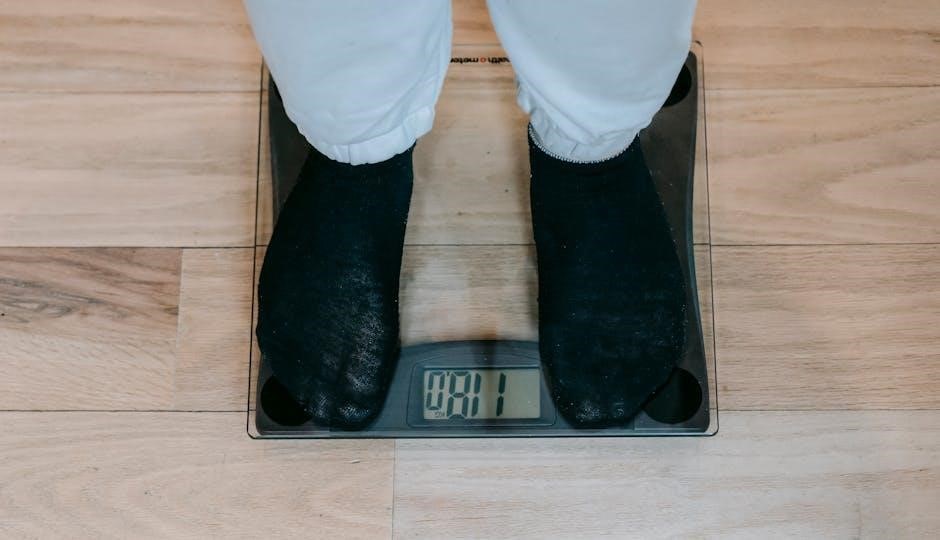
For accurate readings, place your EatSmart bathroom scale on a hard, flat surface – carpet can cause inaccuracies. Step onto the scale and stand still, distributing your weight evenly. Avoid movement until the display stabilizes.
Ensure your feet are centered on the platform. The scale automatically powers on when weight is applied. Remember to select your preferred unit (lb, kg) beforehand using the UNIT button.
Proper Placement for Accurate Readings
Optimal placement is crucial for reliable results. Always position your EatSmart bathroom scale on a firm, level surface like tile or hardwood. Avoid carpet or uneven flooring, as these can significantly impact accuracy.

Ensure the scale isn’t touching a wall or other objects. A stable, hard surface allows the internal sensors to function correctly, providing consistent and precise weight measurements every time.
Standing Still During Measurement
For the most accurate reading with your EatSmart bathroom scale, it’s essential to remain perfectly still throughout the measurement process. Avoid shifting your weight, wiggling your toes, or talking.
Distribute your weight evenly across the platform, ideally with your feet centered. The scale needs a stable, consistent input to calculate your weight correctly. Movement introduces errors, so stillness is key!
Troubleshooting Common Issues
Experiencing problems with your EatSmart scale? Don’t worry! Common issues include the scale not powering on – check the batteries and compartment. Inaccurate readings often stem from uneven surfaces or needing calibration.
Ensure proper battery installation and a flat, hard surface. If problems persist, consult the error code section or explore the calibration procedures outlined in this manual for a quick fix.
Scale Not Turning On
If your EatSmart scale fails to power on, the first step is to verify the batteries. Ensure they are correctly installed with the flat end against the spring, as indicated in the battery compartment.
Replace the batteries with fresh ones, even if the existing ones seem partially charged. Also, check the battery compartment for any corrosion or obstructions preventing a good connection.
Inaccurate Readings
Inconsistent readings often stem from improper placement. Always position your EatSmart scale on a hard, flat surface; carpets or uneven floors cause errors. For bathroom scales, stand still with weight evenly distributed.
Calibrate the scale following the manual’s instructions. Ensure no objects are near the scale during use. If issues persist, replace the batteries, as low power can affect accuracy.

Error Codes and Their Meanings
EatSmart scales utilize error codes to indicate specific issues. While codes vary by model, “Lo” typically signals low battery power, requiring immediate replacement. An “Err” message suggests an overload – remove weight.
If the display shows “OL”, the scale has exceeded its maximum capacity. Consult your user manual for a complete list of error codes and corresponding solutions for your specific EatSmart scale model.
Maintaining Your EatSmart Scale
Regular cleaning extends your EatSmart scale’s lifespan. Use a slightly damp cloth to wipe the surface; avoid harsh chemicals or immersion in water. For kitchen scales, ensure the platform is dry before use.
Store your scale in a cool, dry place, away from direct sunlight and extreme temperatures. Remove batteries for prolonged storage to prevent corrosion. Proper care ensures accurate readings for years!
Cleaning Instructions
To clean your EatSmart scale, always begin by ensuring it’s powered off. Gently wipe the surface with a slightly damp cloth – avoid abrasive cleaners or harsh chemicals. Never submerge the scale in water, as this can cause damage.
For stubborn marks, a mild soap solution can be used, followed by a clean, damp wipe. Ensure the scale is completely dry before resuming operation to maintain accuracy.
Storage Recommendations
When storing your EatSmart scale, choose a cool, dry location away from direct sunlight and extreme temperatures. Avoid areas with high humidity, which could affect the scale’s internal components.
Protect the scale from dust and potential physical damage by storing it in its original packaging or a protective case. Ensure batteries are removed for prolonged storage to prevent corrosion and maintain optimal performance.
Safety Precautions
Always handle the EatSmart scale with care, avoiding drops or impacts. Do not disassemble the scale, as this may cause damage or injury. Keep batteries out of reach of children.
Never immerse the scale in water or any other liquid. This device is not intended for commercial use. If the scale malfunctions, discontinue use and consult the troubleshooting section or contact customer support.
Warranty Information
EatSmart scales are backed by a 2-Year Guarantee against manufacturing defects. This warranty covers parts and labor for repairs or replacement. Damage due to misuse, accidents, or unauthorized modifications is not covered.
To initiate a warranty claim, retain your proof of purchase and contact EatSmart customer support. The warranty is valid from the original date of purchase. See our website for complete details and claim procedures.
2-Year Guarantee Details
EatSmart’s 2-year guarantee safeguards against defects in materials and workmanship. This doesn’t cover normal wear, battery depletion, or damage from improper use. We will, at our discretion, repair or replace the defective unit.
To claim, provide proof of purchase and a description of the issue. Shipping costs for returns may apply. This guarantee is non-transferable and applies to the original purchaser only. Visit our website for full terms.
Where to Find Additional Support & Manuals
Need help? Visit the official EatSmart website for an extensive FAQ section, troubleshooting guides, and downloadable manuals for all models. You can also access product registration and warranty claim forms online.
For direct assistance, contact our customer support team via email or phone – details are available on our website. We are committed to providing prompt and helpful support to ensure your satisfaction.